Device Trust & BYOD: The Access Matrix Every CTO Needs
Published
Your MFA rollout covered who the user is. It didn’t cover what they’re logging in from. JumpCloud’s 2025 SME IT Trends report puts BYOD adoption at 82–95%, and Microsoft’s threat telemetry attributes 80–90% of ransomware detonations to unmanaged devices. Conditional Access without device trust is a policy written on paper that a jailbroken phone will walk right through.
This is Phase 2, Chapter 1 of the 90-Day Zero Trust Playbook. Phase 1 put identity controls on the user. Phase 2 extends those controls to the endpoint: is this device patched, encrypted, running EDR, and not rooted? You don’t ban personal devices — you put them in a tier with access that matches their posture.
Key Takeaways
- 82–95% of organisations allow BYOD in some form (JumpCloud 2025); 74% of enterprises with 500+ employees run MDM (Gartner)
- 80–90% of ransomware detonations involve unmanaged endpoints (Microsoft); nearly half of breached companies trace initial access to an unmanaged device
- BYOD pays back in productivity — Cisco’s BYOD Economics study found 68% productivity improvement and ~37 extra minutes of work per week per employee — but only when device posture is enforced
- MDM pricing is not the bottleneck: Microsoft Intune runs ~$8/user/month (bundled in many M365 plans), Jamf $4–20/device/month. Change management is the cost line that overruns
- Executive devices are the political fight that decides whether this works. Make them pilot users, not exceptions
The BYOD Reality Nobody Wants to Say Out Loud
The honest starting line: most of your T0 and T1 systems are already being accessed from personal phones, personal laptops, and occasionally from a family member’s iPad. JumpCloud’s survey pegs BYOD authorisation at 82–95% depending on vertical, and even in orgs that officially ban it, 54% report more than 20% of endpoints are unmanaged.
This is not fixable by policy memo. It is fixable by giving every device a tier of access that matches what you know about it — and making the path to the higher tiers attractive enough that employees self-enroll.
The Four-Tier Access Matrix
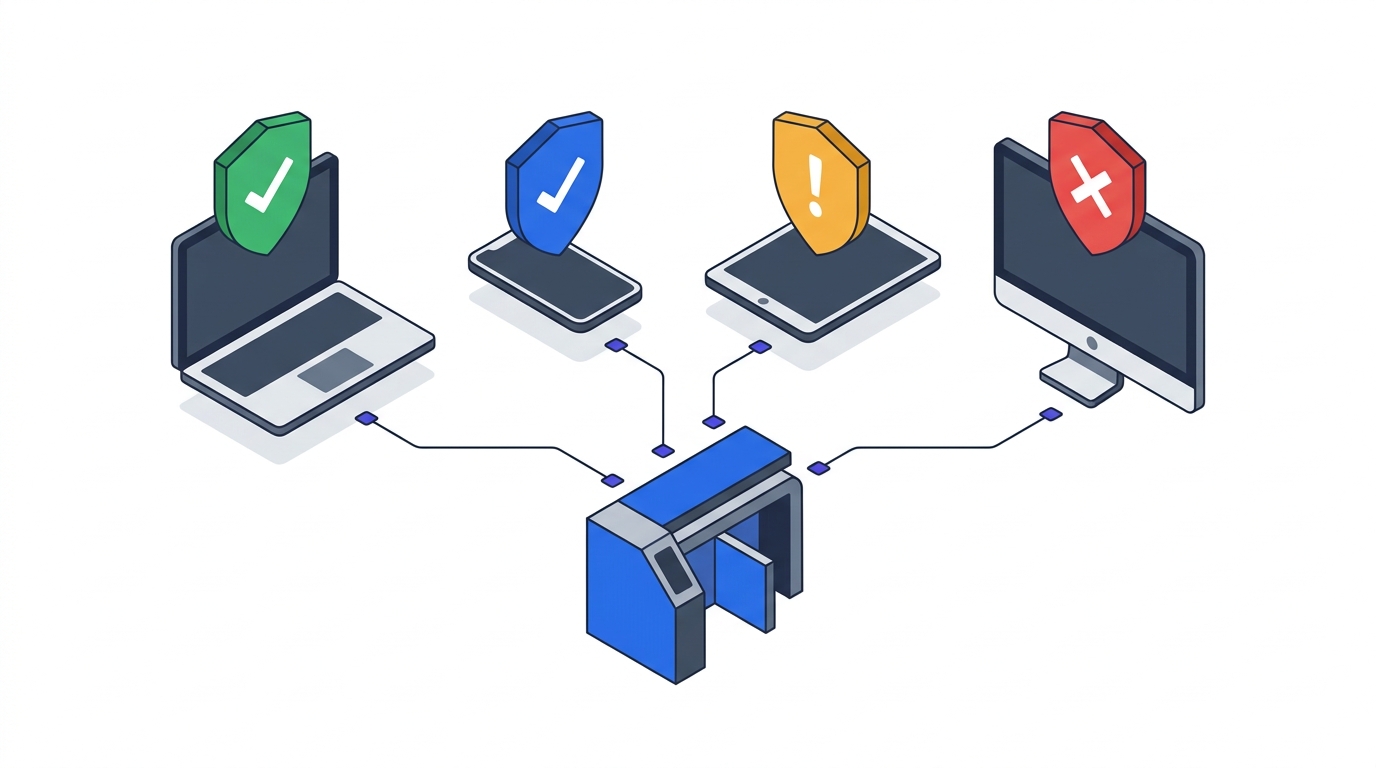
This is the core artifact of P4. Every device your identity provider sees lands in exactly one of four tiers, and each tier has a pre-defined access envelope.
Tier 1 — Corporate-managed (full access). Corporate-issued laptops and phones enrolled in your MDM, joined to your identity tenant, running EDR, full-disk encrypted, patch level within policy. Access: full T0–T3 applications, including sensitive data classes. This is the gold path.
Tier 2 — MDM-enrolled BYOD (limited access). Personal device, voluntarily enrolled in MDM or MAM (mobile application management — container-based, doesn’t touch personal data). Compliance checks pass. Access: productivity apps (email, chat, docs), browser access to most business apps, no download of classified data, no local caching of sensitive databases.
Tier 3 — Unmanaged BYOD (browser-only, short-lived). Personal device, not enrolled, but user authenticated with MFA. Access: read-only browser sessions to a curated set of apps, session cookies that expire in hours not weeks, no file download. This tier is how you say yes to “I’m on vacation and need to check one thing” without saying yes to a ransomware vector.
Tier 4 — Non-compliant (blocked). Jailbroken, rooted, missing encryption, outdated OS, EDR disabled, or enrolled-then-drifted-out-of-compliance. Access: self-service remediation portal only. Everything else denied until posture is restored.
The matrix lives as a Conditional Access policy set (Entra ID, Okta Device Trust, Duo Device Health) that reads device-trust signals from your MDM and your endpoint telemetry. The policy doesn’t care what the device is; it cares what signals it emits.
Device Health Signals Worth Enforcing
Don’t design bespoke requirements. Stick to the signals Conditional Access engines already read natively:
- OS version at or within N minor releases of current. Stale OS is the highest-yield signal for compromise risk.
- Disk encryption on. BitLocker on Windows, FileVault on macOS, native encryption on iOS/Android. This is a binary signal; it’s either on or it isn’t.
- EDR running and reporting. Microsoft Defender for Endpoint, CrowdStrike Falcon, SentinelOne — the specific vendor matters less than “is it alive and phoning home in the last 24 hours.”
- No jailbreak / root. MDM-detected tampering is an automatic drop to Tier 4.
- Patch level current for known-exploited CVEs. CISA’s Known Exploited Vulnerabilities catalogue is a free threshold — if a device is missing a patch for something actively exploited, it goes to Tier 4 until patched.
Every one of these is a direct output of your MDM or EDR. No novel engineering required.
MDM Tool Choice (Less Important Than You Think)
Gartner’s 2023 endpoint management data puts MDM adoption at 74% in 500+-employee organisations. The tooling market has consolidated:
- Microsoft Intune — ~$8/user/month, bundled into most Microsoft 365 E3/E5 plans many orgs already own. Best integration with Entra ID Conditional Access. The default for Windows-heavy estates.
- Jamf Pro — $4–20/device/month depending on tier. macOS/iOS-native depth nobody else matches. Default for design/engineering teams and iPad fleets.
- Workspace ONE (VMware/Omnissa) — strong on mixed-OS and rugged/purpose-built devices. Enterprise pricing.
- JumpCloud / Kandji / Mosyle — leaner SME-focused alternatives for macOS-heavy orgs under 1,000 seats.
The important trade-off isn’t vendor; it’s MDM vs. MAM for BYOD. Full MDM gives you device-level control but requires user consent to what feels like personal-device surveillance. MAM (container-based app management — the “work profile” model) isolates corporate apps and data without touching personal photos or browsing. For BYOD Tier 2, MAM is almost always the right answer. Employees enroll because the deal is fair.
The Executive Device Problem
Every Phase 2 rollout hits the same wall: a senior executive refuses to enroll a personal iPhone, demands an exception, and now the policy has a visible hole. The CISO’s options are (1) grant the exception and watch the program lose credibility, (2) block them and trigger a steering-committee fight, or (3) use them as a lever.
The third option works best. Make the executive team the pilot group, not the exception list. Frame it: “We need you to run the enrolment first so we can iron out friction before we ship to the company.” When the C-suite device fleet is the most compliant, ambient pressure does the rest of the work.
If you cannot get that political commitment, this phase is not ready to ship. Return to governance (Governance Structure for Zero Trust Programmes) and re-open the steering-committee conversation before instrumenting further.
What You Hand to Phase 3
By the end of this chapter, you should have:
- Every corporate-owned device enrolled in MDM with compliance reporting live
- A device-tier signal flowing into your Conditional Access engine (Entra ID, Okta, Duo) as an access input
- Tier 3 (browser-only) access path designed and tested for unmanaged BYOD
- Tier 4 self-service remediation path published so employees can fix their own device and regain access
- Executive pilot group enrolled and visibly compliant
Combined with the asset and flow baseline from Network Baselining, you now know who is connecting, from what, and to where. Chapter P6 (Micro-Segmentation Design) turns that into policy.
Return to the 90-Day Playbook hub for the full Phase 2 sequence.